multiwork detects a compatible local Agent command and exposes its readiness, capabilities, and session behavior. Approved Agent Connectors can be added through the Agent Connector SDK.
From a mention to a shared plan. Watch Agents take a code review forward.
Auto DiscussionCode Change Review
Task
YOUR TASK
Review this code change. Find risks and suggest improvements.
CodexStarting
I’ll map the change and bring in two peers to check edge cases and implementation.
CodexPeer request
@Hermes, check requirements and edge cases. @OpenCodeReview, review the implementation and tests.
HermesEdge cases
Check empty input and retry behavior so the task can recover from failures.
OpenCodeReviewImplementation review
The approach looks viable. Add a retry test and check that errors are clear.
CodexNext steps
Next: cover empty input, add a retry test, and improve error messages for your review.
1 / 5
THE SHORT ANSWER
What is multiwork?
multiwork is a local-first multi-Agent collaboration workspace for research, analysis, writing, planning, review, and implementation. Selected Agents advance the same task through discussion, authorized execution, and peer review. You set the boundaries and make key decisions when needed.
Supported agents13+
Codex, Claude Code, Gemini CLI, Qwen Code, Kimi Code, MiMo Code, OpenCode, OpenCodeReview, Hermes, Zcode, Pi Agent, OpenClaw, WorkBuddy — detected natively on your machine.
Modes3
Direct · Concurrent Responses · Auto Discussion
Working together
Discuss→ Execute→ Check→ Refine
Agents build on peer contributions and request the next steps, reducing manual coordination.
Runs on
Windows · x64 · Electron
Local conversations and run history; models may use external providers.
THE WORK CELL
Set up the task. Let the group move it forward.
01
Select
Choose the local Agents and participants. Participants are always selected by you — never auto-assigned from a roster.
02
Scope
Bound the goal, working directory, context, and permissions. Every run starts from a frozen task snapshot.
03
Collaborate
Start Auto Discussion so Agents can discuss, request contributions, carry out authorized work, and check deliverables.
04
Decide & check
Step in for missing information, permissions, or key decisions. Check the deliverables and request changes when needed.
COLLABORATION MODES
Three ways agents work together.
Work with one Agent, compare independent replies, or let a group advance a task together.
>
Direct
One selected Agent keeps its conversation and native session when supported.
Best for focused work with one Agent.*
Concurrent Responses
Selected Agents receive the same frozen task snapshot and return independent replies in stable order.
Best for comparing approaches before choosing one.#
Auto Discussion
Agents propose, discuss differences, request peer contributions, carry out authorized work, and check results.
Best for multi-step work with less manual coordination.
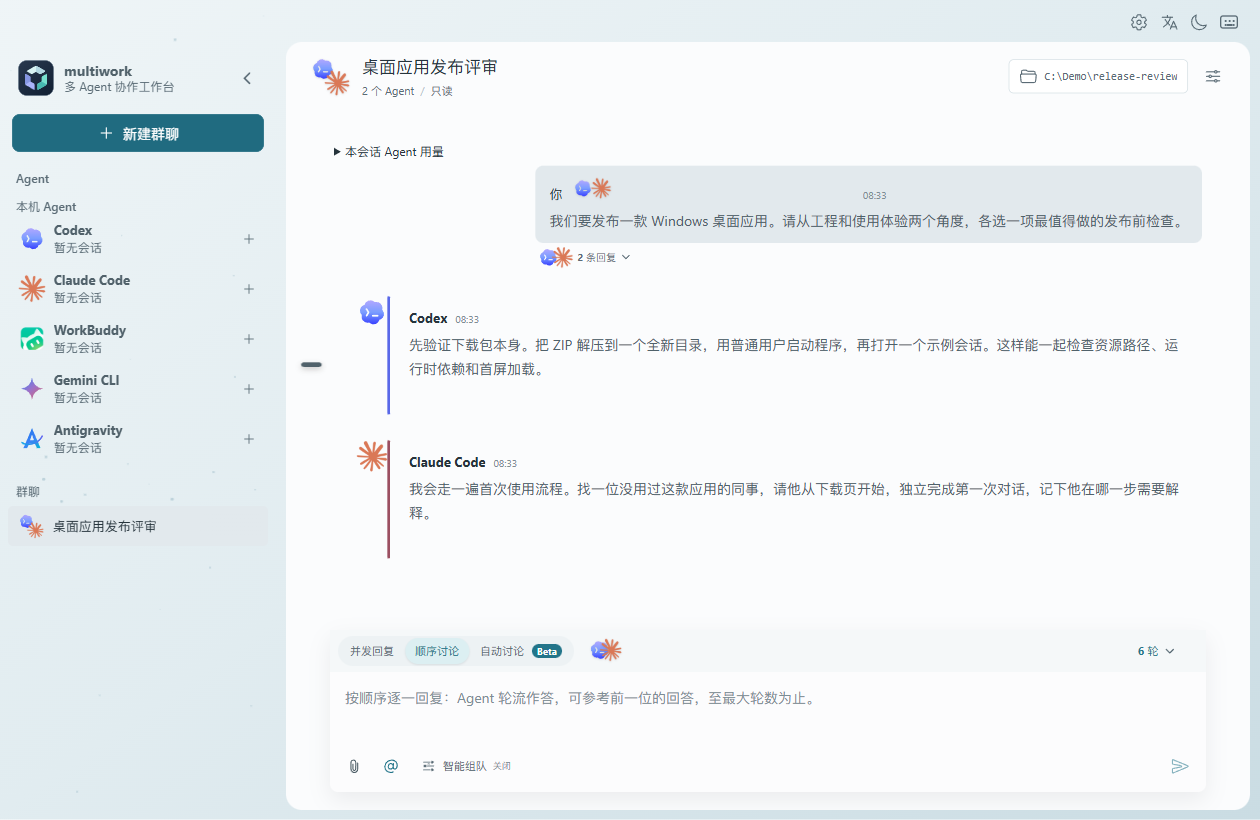
INSIDE THE WORK CELL
One workspace for the group and its work.
Windows desktop · Sample group conversation
Follow each participant
In concurrent mode, each reply appears when ready. Stop an individual participant while others continue.
Inspect usage
Expand agent usage to see available token counts. Supported Codex sessions also report quota windows.
Return to a task
Browse local tasks by status and select a card to return to the original request.
Try a task such as reviewing a PR, analyzing a bug, or drafting a plan. Choose compatible Agents, give them shared context, and start Auto Discussion. They can compare approaches, request further work, and check deliverables. Authorize workspace writes when implementation is needed, and respond when they need a key decision.
HOW multiwork DIFFERS
Spend less time managing the handoffs.
multiwork brings the Agent tools you already run into a local-first collaboration workspace. Let the group discuss and advance the task, while you focus on the goal, boundaries, and key decisions.
Agents coordinate the next contribution
Agents can request a peer's input or review, and the delivery owner judges whether more work or a user decision is needed.
Authorized execution and peer review
Enable workspace writes for implementation tasks. Agents can carry out work within that scope and ask peers to check the deliverables.
Local-first boundaries
Runs in your Electron work cell with existing CLIs. No cloud Agent fleet, no required server, conversations stay local.
Shared context and local history
Keep the brief, peer replies, run state, and deliverables together so you can revisit progress and continue the work.
WHERE multiwork FITS
Where task collaboration fits in your workflow.
multiwork focuses on shared tasks across the local Agent tools you choose. Here is how that focus relates to other ways of organizing Agent work.
Category
What it focuses on
multiwork's difference
Individual Agent sessions
Work with an Agent through its own interface and tools.
Bring selected CLIs into a shared task where Agents can discuss and request peer contributions.
Hosted Agent execution
Run work in a remotely managed environment.
Local Electron desktop app using the CLIs already installed on your machine.
Agent messaging
Exchange messages and events between participants.
Connect discussion to authorized execution, deliverable review, and task progress decisions.
Parallel workspaces
Organize separate tasks or branches running at the same time.
Let different Agent CLIs build on each other's contributions to the same task.
Custom orchestration
Build and maintain your own task routing and collaboration logic.
A ready-to-use desktop workflow across 13+ heterogeneous CLIs — no orchestration framework to assemble.
THE BOUNDARY
What multiwork is, and isn't.
Is
A local-first desktop workspace for multi-Agent collaboration.
A working group built from the Agent CLIs you select.
Shared context, authorized execution, peer review, and local run history.
Workspace writes as opt-in workflow controls.
Open source under the Apache License 2.0.
Isn't
Not a hosted Agent fleet or general Agent framework.
Not automatic participant selection from a larger roster.
Not a guarantee that every task finishes without your input.
Not an operating-system sandbox — writes happen through your shell.
Not fully offline — a selected Agent may send prompts to its own CLI provider.
ANSWERS
Questions teams ask before adopting.
Short, honest answers — the long versions live in architecture.md ↗.
multiwork is a local-first multi-Agent collaboration workspace for Windows. It brings your existing Agents into one working group to share context, discuss approaches, carry out authorized work, and check results. You choose the participants, set goals and permissions, and step in when information or key decisions are needed.
multiwork stores conversations and coordinates work locally. Selected Agents may send prompts, attachments, or Skills to the model provider configured in their own CLI. Local-first describes where multiwork stores and coordinates the work; it does not mean the model runs offline.
Thirteen today — Codex, Claude Code, Gemini CLI, Qwen Code, Kimi Code, MiMo Code, OpenCode, OpenCodeReview, Hermes, Zcode, Pi Agent, OpenClaw, and WorkBuddy. Approved Agent Connectors can be added through the Agent Connector SDK; custom executables use the desktop custom-Agent path.
Selected Agents start with independent proposals, then discuss differences, request peer contributions, carry out authorized work, and check deliverables. A delivery owner judges progress and whether more work or a user decision is needed. You do not need to direct every round, but missing information, permissions, or key decisions can still require your input.
multiwork adds task-level collaboration across selected Agent CLIs: shared context, peer discussion, requests for further contributions, authorized execution, and review of deliverables. This reduces the work of relaying replies and coordinating next steps yourself. Collaboration history and run state stay local so you can revisit progress and blockers.
You choose the Agents, goal, context, and permissions. Auto Discussion lets Agents advance the work without you directing each turn, but missing information, permission requests, or key tradeoffs may require your input. Workspace writes are opt-in. Check important deliverables before using them; peer review does not guarantee correctness.
Open source under the Apache License 2.0. Commercial use, private use, modification, and redistribution are permitted under the license terms. No separate commercial authorization or license fee is required. Apache-2.0 does not grant trademark rights — see COMMERCIAL_USE.md ↗.
Version 1.1.0 includes a Windows x64 ZIP. Extract the entire archive and start multiwork.exe.






 OpenClaw
 WorkBuddy
 Zcode
 Pi Agent
 MiMo Code
 OpenCode
 OpenCodeReview
 multiwork
Download V1.1.0